
- Posts: 12
Postings
You can freely browse the forum and post in the community forum.
However, you need a valid license to write posts for support (own a valid commercial software license or have purchased a support membership).
Posts only show once reviewed. This is mainly preventive to keep spam away. Thank you for your understanding!
Read more to full article
- mkonop
-
 Topic Author
- New Member
-

Less
More
IP: 73.215.123.213
6 years 2 months ago #5299
by mkonop
Read more to full article was created by mkonop
I want to show the full article with the Read More link. Now only the portion of the article after Read More is displayed. I have LINKING set to LINK ON TITLE and READ MORE.
Thanks!
- syw
-

- Administrator
-

Less
More
- Posts: 829
IP: 24.185.124.166
6 years 2 months ago #5300
by syw
Olivier.
Replied by syw on topic Read more to full article
Hello I am not sure I understand.
Are you talking about the article once the user has clicked on the link (either the title or the read more link) ?
If that is the case, what the article shows has nothing to do with Latest News Enhanced. It is setup in your Content (Articles) settings.
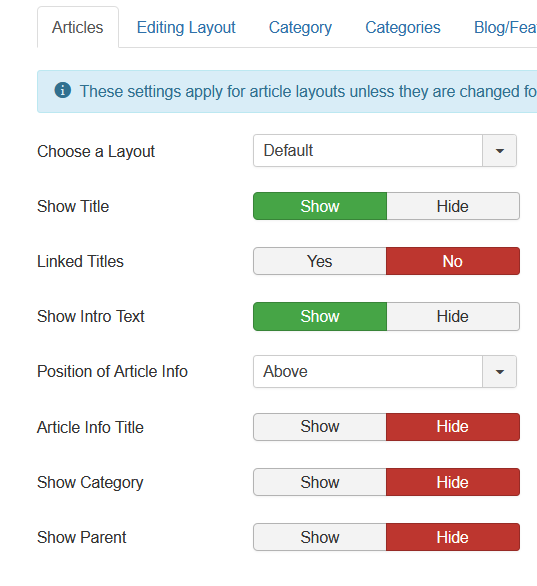
In the 'Articles' global configuration settings, in the first tab, there is the option 'Show intro text'. You have to set it to 'Show'.
Olivier.
- mkonop
-
Topic Author
- New Member
-
Less
More
- Posts: 12
IP: 73.215.123.213
6 years 2 months ago #5301
by mkonop
Replied by mkonop on topic Read more to full article
I thought it might have been with Latest News Enhanced since I have Show Intro Text set to SHOW in the Article options. Now I don't know where to look for my error 
- syw
-
- Administrator
-
Less
More
- Posts: 829
IP: 24.185.124.166
6 years 2 months ago #5302
by syw
Olivier.
Replied by syw on topic Read more to full article
Well, that setting is also available in menu items (like category blog) and each individual article. So make sure that it has not been modified somewhere else.
Note that if your articles show under a specific menu item, you should check that menu item.
Olivier.
- mkonop
-
Topic Author
- New Member
-
Less
More
- Posts: 12
IP: 73.215.123.213
6 years 1 month ago #5303
by mkonop
Replied by mkonop on topic Read more to full article
I found the solution. Although I had set global options to SHOW and I had set Show Intro Text to: Use Global (Show) - I had to change to SHOW. I may have created the articles before I had set the options.
Thanks for your help!
- syw
-
- Administrator
-
Less
More
- Posts: 829
IP: 98.193.90.68
6 years 1 month ago #5306
by syw