- Posts: 1931
Postings
You can freely browse the forum and post in the community forum.
However, you need a valid license to write posts for support (own a valid commercial software license or have purchased a support membership).
Posts only show once reviewed. This is mainly preventive to keep spam away. Thank you for your understanding!
src images after restore site
- admin
-

- Administrator
-

Less
More
IP: 68.194.32.124
11 years 2 months ago #4372
by admin
Olivier.
Replied by admin on topic src images after restore site
You are welcome.
Where are the pictures in the articles then? in the intro image? The full image?
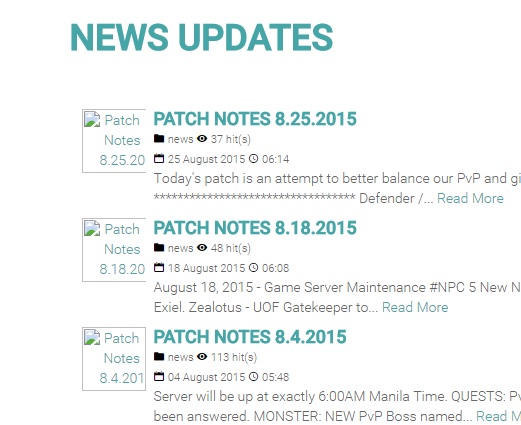
For instance, the article www.shaiya.com.ph/community/news-updates...atch-notes-8-25-2015 does not contain any image when going into 'read more'. It does not show intro or full image either when I look at the article.
The module, as far as I can see, does not find an image. It is not that it cannot show them, it just does not find any.
What is the 'head type' selected in the module ('Layout' tab)?
Have you tried adding a default image in the 'Head:image' tab?
Olivier.
- jatsjames
-
 Topic Author
- New Member
-

Less
More
- Posts: 9
IP: 92.96.201.171
11 years 2 months ago #4373
by jatsjames
Replied by jatsjames on topic src images after restore site
Thanks.
And Yes it's only on the intro image.
All thumbnails still intact in /tmp folder.
FYI. Before I enable SEF and Rewrite Rules, all is working fine. I may need a rewrite rule to allow images on /tmp folder to show.
- jatsjames
-
Topic Author
- New Member
-
Less
More
- Posts: 9
IP: 92.96.201.171
11 years 2 months ago #4374
by jatsjames
Replied by jatsjames on topic src images after restore site
My second option is to try reinstalling on top of it, does it remove the data?
- admin
-
- Administrator
-
Less
More
- Posts: 1931
IP: 68.194.32.124
11 years 2 months ago #4375
by admin
Olivier.
Replied by admin on topic src images after restore site
You have another option:
in the latest module versions, you have the possibility to change the /tmp path to the /images path, which is not restricted.
That may fix your problem.
Re-installing (without uninstalling first) does not loose data.
Olivier.
- jatsjames
-
Topic Author
- New Member
-
Less
More
- Posts: 9
IP: 92.96.201.171
11 years 2 months ago #4376
by jatsjames
Replied by jatsjames on topic src images after restore site
Thank you so much for the quick and precise reply.
Let me try the options suggested and get back for a working solution.
The following user(s) said Thank You: admin
- jatsjames
-
Topic Author
- New Member
-
Less
More
- Posts: 9
IP: 92.96.201.171
11 years 2 months ago #4377
by jatsjames
Replied by jatsjames on topic src images after restore site
After I installed the version 2.0.2, picture was showing but path was incorrect..somehow I messed up.
Can you check the attach file and please help..