
- Posts: 6
Postings
You can freely browse the forum and post in the community forum.
However, you need a valid license to write posts for support (own a valid commercial software license or have purchased a support membership).
Posts only show once reviewed. This is mainly preventive to keep spam away. Thank you for your understanding!
CSS override for font colors
- ChessDigital
-
 Topic Author
- New Member
-

Less
More
IP: 93.198.193.234
13 years 2 months ago #3229
by ChessDigital
CSS override for font colors was created by ChessDigital
I'm using the module with a red background, and the default fonts from the module title and article paragraphs are black -- too dark.
How can I override the CSS for this one module to make them white or #f4f4f4?
In the Styles options --> CSS overrides, it seems I should start with this:
But then I haven't been able to find the right syntax.
How can I override the CSS for this one module to make them white or #f4f4f4?
In the Styles options --> CSS overrides, it seems I should start with this:
Code:
.latestnewsenhancedextended_190
But then I haven't been able to find the right syntax.

- admin
-

- Administrator
-

Less
More
- Posts: 1931
IP: 207.181.228.28
13 years 2 months ago - 13 years 2 months ago #3230
by admin
Olivier.
Replied by admin on topic Re: CSS override for font colors
Hello,
use something like:
use something like:
Code:
.latestnewsenhancedextended_190 .newstitle,
.latestnewsenhancedextended_190 .newsintro {color: white !important}
Olivier.
Last edit: 13 years 2 months ago by admin.
- ChessDigital
-
Topic Author
- New Member
-
Less
More
- Posts: 6
IP: 93.198.193.234
13 years 2 months ago #3232
by ChessDigital
Replied by ChessDigital on topic Re: CSS override for font colors
That almost works!
It takes care of the article's title, and text, but the module title remains black.

I could instead hide the module title and accomplish this by using the category name (which is the same)
Linking-->Category-->Show

But I'd still need the font size to be larger, e.g. 14pt. Can I do that with another override?
It should be about the same size as the module title currently is.
Either solution will work for me.
Thanks again!
It takes care of the article's title, and text, but the module title remains black.
I could instead hide the module title and accomplish this by using the category name (which is the same)
Linking-->Category-->Show
But I'd still need the font size to be larger, e.g. 14pt. Can I do that with another override?
It should be about the same size as the module title currently is.
Either solution will work for me.
Thanks again!
- admin
-
- Administrator
-
Less
More
- Posts: 1931
IP: 207.181.228.28
13 years 2 months ago #3233
by admin
Olivier.
Replied by admin on topic Re: CSS override for font colors
The module's title depends on your template, it is not part of the module itself. You will need to override your template's CSS, not the module's.
Olivier.
- ChessDigital
-
Topic Author
- New Member
-
Less
More
- Posts: 6
IP: 93.198.193.234
13 years 2 months ago #3234
by ChessDigital
Replied by ChessDigital on topic Re: CSS override for font colors
Fair enough for option 1, but what about editing the font size when you display the category?
Basic Options
Linking
Category --> Show
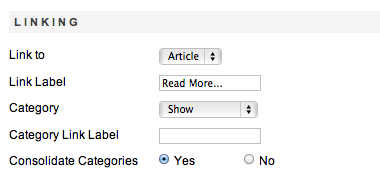
That would work if it were just a bit larger -- larger than the article title.
Basic Options
Linking
Category --> Show
That would work if it were just a bit larger -- larger than the article title.
- admin
-
- Administrator
-
Less
More
- Posts: 1931
IP: 207.181.228.28
13 years 2 months ago #3235
by admin
Olivier.
Replied by admin on topic Re: CSS override for font colors
The category is using the class '.catlink'.
If you have not done so, I would suggest you enable the developer tools of your browser. With such tools, you can check what styles are applied to the elements you want to modify. It makes it much easier. You can even test your desired modification that way on the fly!
If you have not done so, I would suggest you enable the developer tools of your browser. With such tools, you can check what styles are applied to the elements you want to modify. It makes it much easier. You can even test your desired modification that way on the fly!
Olivier.