
- Posts: 5
Postings
You can freely browse the forum and post in the community forum.
However, you need a valid license to write posts for support (own a valid commercial software license or have purchased a support membership).
Posts only show once reviewed. This is mainly preventive to keep spam away. Thank you for your understanding!
[SOLVED] Publish date shows current date always
- taunwillis
-
 Topic Author
- New Member
-

Less
More
IP: 70.190.0.52
14 years 3 weeks ago - 14 years 2 weeks ago #1134
by taunwillis
[SOLVED] Publish date shows current date always was created by taunwillis
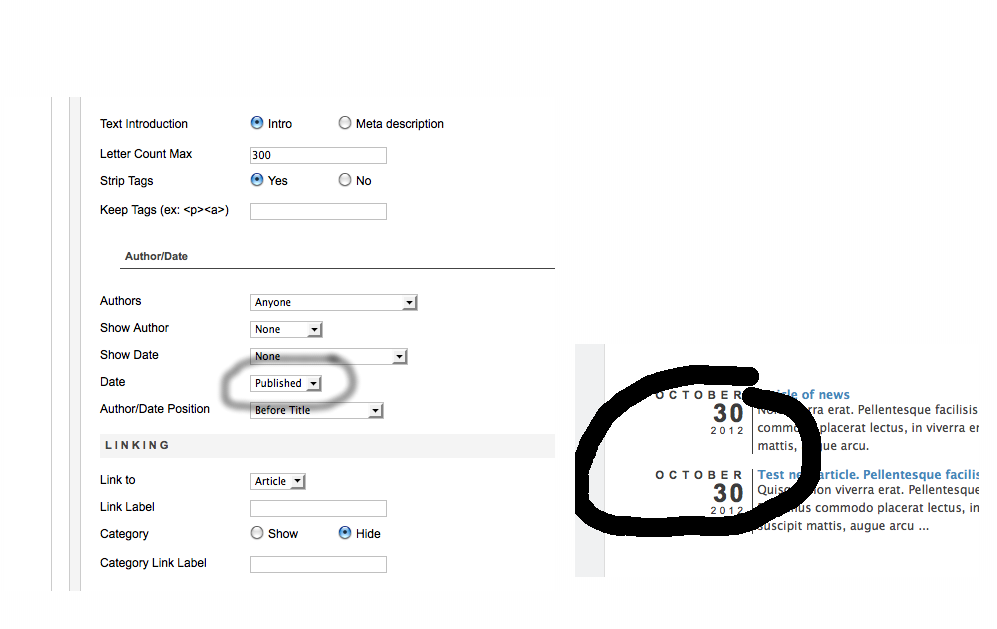
When configuring to use the Calendar option, and setting the Date to use the 'publish date', it actually shows the current date, not the publish date.
The 'create date' option works fine, but the 'publish date' option always displays the current date. How can I fix this?
The 'create date' option works fine, but the 'publish date' option always displays the current date. How can I fix this?
Last edit: 14 years 2 weeks ago by taunwillis.
- admin
-

- Administrator
-

Less
More
- Posts: 1931
IP: 207.229.131.129
14 years 3 weeks ago #1136
by admin
Olivier.
Replied by admin on topic Re: Publish date shows current date always
I will take a look and add the fix to the upcoming release.
Thanks for the catch and your feedback!
Thanks for the catch and your feedback!
Olivier.
- admin
-
- Administrator
-
Less
More
- Posts: 1931
IP: 207.229.131.129
14 years 3 weeks ago #1137
by admin
Olivier.
Replied by admin on topic Re: Publish date shows current date always
I have extensively tested the problem and it does seem to work correctly.
Be aware that when you create a new article, the create date and publish date are identical.
Be aware that when you create a new article, the create date and publish date are identical.
Olivier.
- taunwillis
-
Topic Author
- New Member
-
Less
More
- Posts: 5
IP: 166.137.156.22
14 years 3 weeks ago #1138
by taunwillis
Replied by taunwillis on topic Re: Publish date shows current date always
Both of the articles you see in my screenshot attachment were published earlier last week. One on the 23rd, the other on the 25th, yet the calendar control shows both as today Oct 30. When I changed the control to use the create date, the calendar shows the correct create date. But when I set it to show the publish date, it shows e current days date, whatever that date may be.
- admin
-
- Administrator
-
Less
More
- Posts: 1931
IP: 207.229.131.129
14 years 3 weeks ago #1139
by admin
Olivier.
Replied by admin on topic Re: Publish date shows current date always
I wonder what can be the cause, I do not get this behavior at all... Can you please add a screenshot of one of your article's publishing options? Thank you.
Olivier.
- taunwillis
-
Topic Author
- New Member
-
Less
More
- Posts: 5
IP: 166.137.156.30
14 years 3 weeks ago #1140
by taunwillis
Replied by taunwillis on topic Re: Publish date shows current date always
I tried attaching 3 screenshots, but im on my ipad tonight so I couldnt attach them. I will attach them to an email and email them to you.
I created a Test article. It has a Create date of 10/29, and a publish date of 10/30. I configured the display option to show the publish date above the title, and it shows 10/30 as expected, but the calendar to the left shows 10/31.
Note: previously, all of the articles were showing the current day's date, but I went into the articles and manually reset the create and publish dates. When I did, they stopped showing the current day's date, and now they simply show the publishing date, but all are off by 1 day.